Find your exact language row
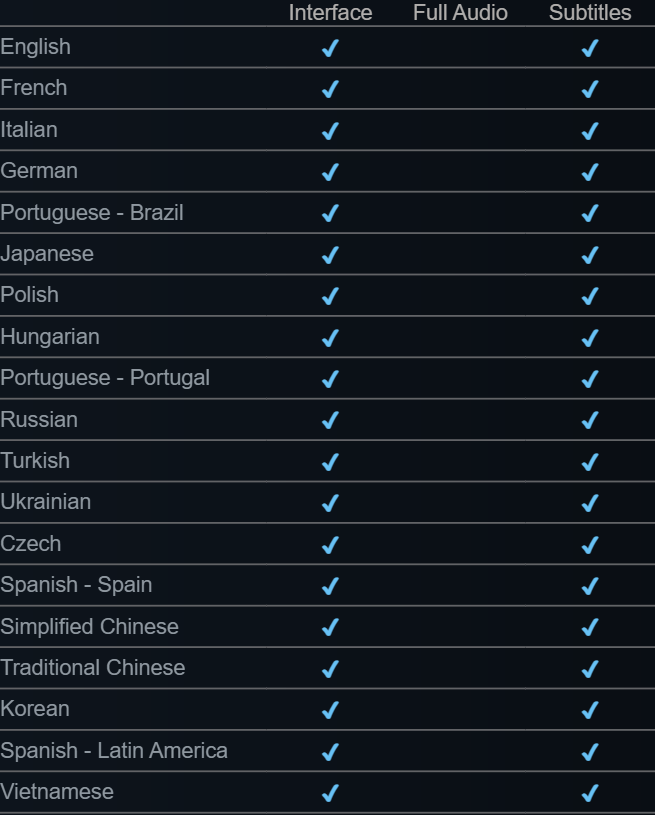
Both Simplified and Traditional Chinese have interface and subtitle checkmarks. So do Japanese, Korean and Vietnamese. Portuguese has separate Brazil and Portugal rows; Spanish has separate Spain and Latin America rows. The other listed options are English, French, Italian, German, Polish, Hungarian, Russian, Turkish, Ukrainian and Czech.
On the store page look below the controller information for Languages. The collapsed table shows the first few rows; choose “See all 19 supported languages” before checking a language lower down. Read the whole row label, including the region. Compare its first and third checkmark positions with the header, especially if your language appears in two regional variants.
Check voices separately
The Steam table has distinct columns for interface, full audio and subtitles. All 19 rows in the listing checked November 8, 2026 have interface and subtitle checkmarks, with the full-audio column blank. In particular, the English row confirms English text and subtitles but does not advertise a full English dub. For a spoken-audio requirement, the subtitle checkmark alone cannot answer a buying decision.
Follow a single row horizontally from its language name. There is a check under Interface and another under Subtitles, with an empty Full Audio cell between them. If you specifically need voice acting in a particular language, give the developer that exact language name and ask about voice coverage; a translated title screen or an English-speaking trailer provides no per-language audio matrix.
When the localized words look wrong
The first hotfix fixed long localized objective and upgrade titles that extended beyond their boxes. The second rewrote the French wording for the T-34 bucket. If you still find an unclear line, capture the language, the entire panel and the object it describes. That gives the developer enough context to distinguish an inaccurate translation from text that is merely clipped on screen.
For a localization report include the exact original string, your UI language and the menu or item where it appeared. If the last word is cut off, capture the whole box including its right edge, plus the display resolution. If the whole text fits but describes the wrong tool, include what the tool actually did. Those two reports require different corrections.
Sources
- Potato Please · Steam store features and requirements store.steampowered.com
- Golden Horn Studios · Hotfix 1.0.1 steamcommunity.com
- Golden Horn Studios · Hotfix 1.0.2 steamcommunity.com