Start with the minimum configuration
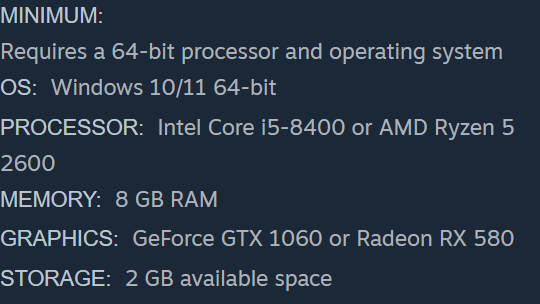
The published minimum is a 64-bit system running Windows 10 or 11, with an Intel Core i5-8400 or AMD Ryzen 5 2600, 8 GB of RAM and a GeForce GTX 1060 or Radeon RX 580. Write down the whole model name when comparing: “Core i5” alone covers many processors. Eight gigabytes meets the stated memory minimum only when the other components also clear their respective requirements.
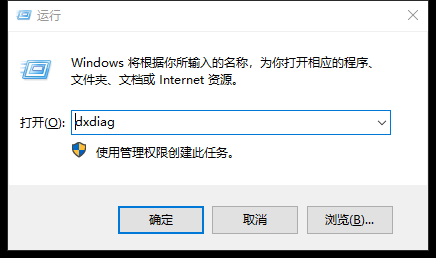
To read your own processor and memory, press Windows key + R, enter dxdiag and press Enter. In the System tab copy the full Processor and Memory lines; 8,192 MB is about 8 GB. Then open the Display tab and copy the graphics adapter name. If a laptop lists multiple adapters, record each, including any discrete GPU. A computer with enough RAM but a different graphics chip still needs a separate GPU comparison.
What changes at the recommended level
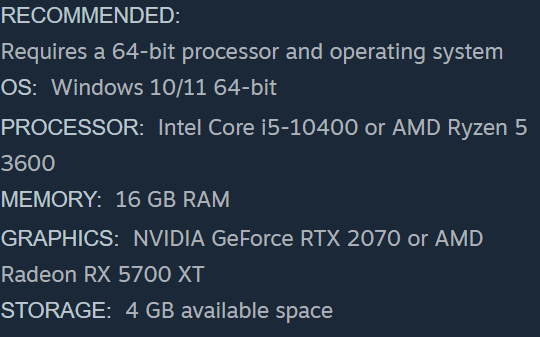
The recommended configuration raises the CPU to a Core i5-10400 or Ryzen 5 3600, memory to 16 GB and graphics to an RTX 2070 or Radeon RX 5700 XT. Windows stays the same. The store lists 2 GB available disk space for minimum and 4 GB for recommended. For a drive close to capacity, compare the free space on the drive where the Steam library is located.
Open File Explorer → This PC and check the drive assigned to your Steam library; free space on a different drive does not help that installation. Write the CPU, memory, GPU and free space as four separate lines. Compare each line with the corresponding recommended entry. A shortfall in storage can be checked again after freeing space. A missing GPU model cannot be resolved by comparing RAM alone.
Read the result before buying
A match to the published configuration gives you a concrete reference point. The table does not specify a target frame rate, resolution, or graphics preset. If one component is below the examples and performance matters to you, look for a capture from the same CPU and GPU at your intended resolution before drawing a conclusion.
For a support ticket, dxdiag also offers Save All Information. Review the exported file before sharing it publicly. If comparing performance reports, note whether the footage was captured at the workbench or late in the shift with an active water channel; hotfix 1.0.2 specifically addressed a late-game jam that could cause slowdowns. A single opening-room frame rate cannot settle how a crowded yard performs.
Sources
- Potato Please · Steam store features and requirements store.steampowered.com
- Microsoft Support · Open DirectX Diagnostic Tool and export information support.microsoft.com
- Golden Horn Studios · Late-game water-channel performance fix steamcommunity.com