Expose the spot before deepening the cut
Work around the damaged area with short strokes. Rotate the piece so you can see the edge of the spot. A player reported that tapping a spot and leaving part of it behind prevented the next potato from starting. Try removing the remaining discolored patch, then release the cut as soon as the patch clears. If a clean potato has already been accepted, look at the next one before cutting further.
Compare the two tools on the same kind of potato
Keep the same difficulty and Journal skills for the comparison. Try a few clean potatoes with the Steel Knife, then a few similarly sized clean ones with the handheld Peeler. Repeat with damaged potatoes. Look at the grade after each one. A player reported good grades with the upgraded Steel Knife on clean potatoes and preferred the Peeler for rot. Another found the Peeler easier to use even when grades were lower.
Measure a short run before spending again
For an income decision, compare money received over the same amount of active peeling time with each tool. Deliver the finished potatoes during both runs and keep fines and assignment rewards out of the comparison. A slower S-grade cut and several faster lower-grade deliveries can pay differently. If your priority is a particular grade, record that separately. The player reports give no fixed earnings rate or guaranteed S-grade tool.
Toggle Auto Hold for the last small patch
At the peeling board, leave Focus mode to see the lower-right skill hints. Golden Horn gives T as the default keyboard toggle for Auto Hold. R toggles Auto Rotate. Switch Auto Hold off before repositioning the blade around a small rotten patch. Check the action label for your own input device, especially after rebinding. If the hint is still absent, verify the skill is unlocked in this save before reloading.
Golden Horn Studios explains the Auto Hold key and Focus mode ↗
If Auto Hold wastes flesh on long sideways strokes
One player got cleaner cuts with short vertical motions while Auto Hold was on. Try a few up-and-down strokes on an undamaged surface and compare the depth with your sideways cut. Stop or toggle Auto Hold off before repositioning. Players have reported S grades on Hard, but their equipment and individual potatoes differed. No source here establishes a universal waste threshold for the grade.
When the cut removes a square chunk
Pause after the unexpected cut and inspect the face for rot. Note whether a cough interrupted the stroke. Players identified both circumstances while comparing unexpectedly deep cuts. Check an undamaged potato with the same knife and release Auto Hold before repositioning. Capture the display if the same cut occurs with a steady hand on clean ones.
When the Auto Hold hint disappears from one save
First check the hint while actually at the peeling board with the skill unlocked. One player had the hint in a second save while the same control was missing from their first. It reappeared when that save reloaded. Try returning to the menu and reloading your existing shift, then check the on-screen hint again. There is no need to reproduce the death that triggered the player’s reload. If it stays missing, capture the skill unlock and the board on that same save.
If the peeler handle turns upside down
A handle that turns end for end while cutting is a different observation from the steady trembling of the hand. In one player’s save the handle sometimes pointed up instead of down even after disabling the shake setting. The player stopped seeing it while using Muscle Memory. If you own that skill, compare a manual stroke and an assisted one with the same tool. Keep a clip that shows the complete change of orientation if it persists. The discussion does not establish that buying a tool tier cures it.
Remove a fresh blood mark from an otherwise clean potato
When a cough splashes the potato, pause the cut and read the instruction above the board. The recorded prompt specifically says to shake the blood off before the potato goes out. Hold the mouse input pictured beside that instruction and move the potato to shake it. Check that the visible splashes and the warning have cleared before resuming. This preserves the flesh under the splash. A dark eye that stays embedded in the surface is a separate peeling problem. Medication at the Character counter addresses later coughs.
Check unused Journal points after a string of C grades
Open the Journal before purchasing a new blade. One player asking about persistent C grades discovered they had more than twelve unused points. Watch why the next ordinary cut goes wrong. If the hand wanders despite available stamina, try Tremor Treatment. If you stop midway to catch your breath, try Stamina. Spend on the observed problem, then compare the next few similar potatoes with the same Peeler. A change of grade on a single unusually clean potato provides little information.
Why a stroke changes the shape itself
A player asked how procedural peeling works. The developer described it as voxel based. Think of each cut as removing small pieces of the potato volume. Once a patch is pale, another pass can change its silhouette while doing little for the skin left on the back.
Make one short stroke, lift away and rotate until the edge of the next strip of skin faces you. If the exposed face is flattening but a dark rim remains, move to the rim. The developer explained the underlying geometry without specifying an exact grading formula.
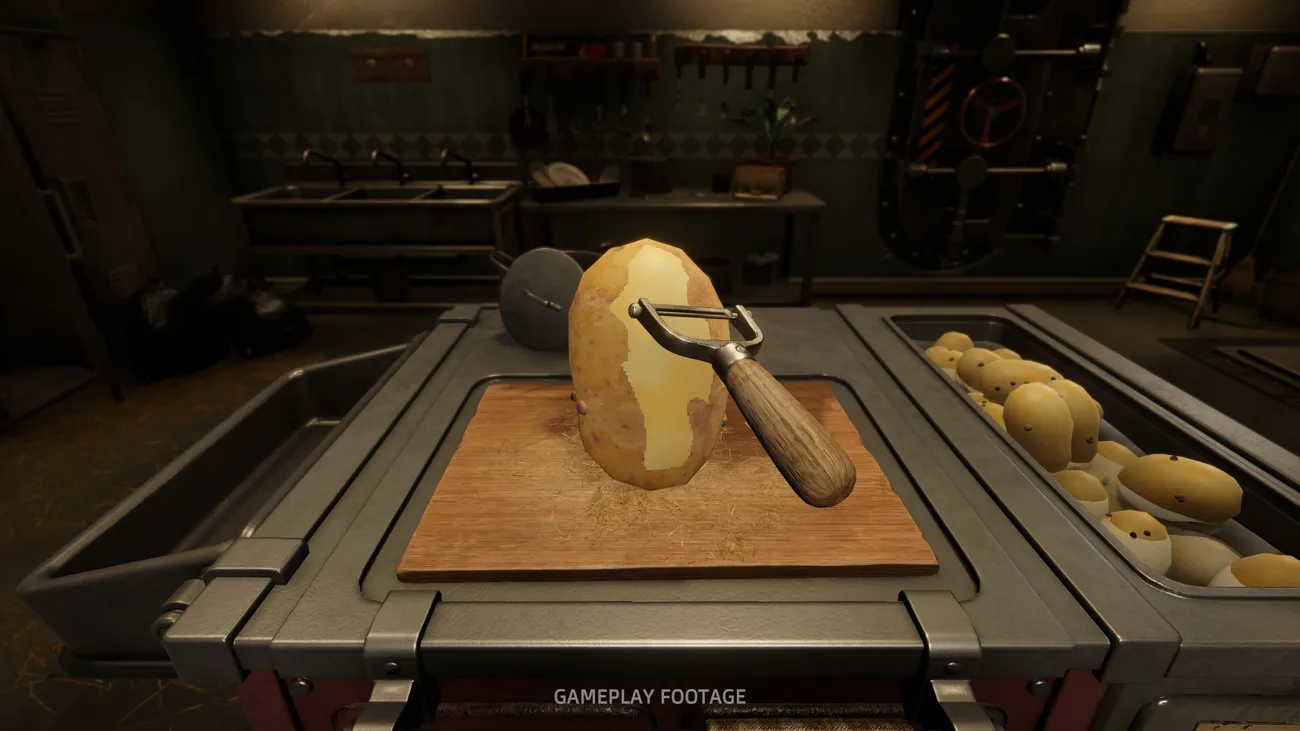

Developer answers questions on r/IndieGaming ↗
Golden Horn Studios: Steam store and game gallery ↗
Stop a circular cut before it drills into a clean face
Let go of the cut as soon as the knife begins looping over pale flesh. With the blade clear, turn the potato until a remaining strip faces you, then try a short stroke with the potato stationary. If you were using Auto Hold, switch it off while repositioning so the blade cannot keep digging through the same spot. On the next potato, change one assist at a time and see whether the looping follows a particular setup. The reviewer who saw the circles did not establish their cause.
Choose an affordable tool for rot before the handheld peeler is unlocked
Turn the damaged patch toward you and stop Auto Hold before moving the tool. A Steam player suggested switching back to the starting knife for this particular job; use the tool slot for the earlier knife while at the board. Try a short cut on the discoloured edge, then check how much edible flesh came away. If both blades remove chunks, do not keep recutting the clean face. Compare them on the next damaged potato and continue saving for the handheld Peeler.
How to deal with rot with min damage? ↗
Auto Hold and wobbly peelers ↗
Read rot and waste before trying to chase an S
Players disagree about the best tool for S grades, and the players who blamed rot did not establish a guaranteed grade cap. Start with a visibly clean potato if you want to compare blade technique. For a damaged piece, inspect its rot and waste readings separately, remove only the affected patches and note the final grade when the board releases it. Compare similarly damaged pieces with the same settings. An S on a clean potato is useful evidence for your technique but does not answer what grade a different damaged piece can reach.
Change the angle when a good face still has a brown band along its lower edge
A clean patch in the middle can hide the next cut. In the screenshot the middle of the potato is pale, but a belt of brown skin remains below it. Lift the blade, rotate the brown belt toward the workable face and start the next shallow stroke on the boundary. Stop if the blade reaches the pale middle again. Check the waste readout after the short stroke. A dark eye isolated in that belt needs a separate, local cut.
Avoid deep cuts when the blade crosses an uneven protrusion
Inven’s player describes clipping protruding bumps and working separately around dark damaged spots. When a bump sticks out into the blade path, turn it toward the camera and start at its near edge. Make one short cut, lift the blade, and look at the new face before trying to shave the adjoining flat surface. A broad cut across both levels can take a chunk out of the flatter part. Watch waste after that first stroke; move to the next unpeeled patch if the newly exposed face is already pale.
Inven Global: hands-on playthrough and original gameplay captures ↗
When the middle of the potato has already been cut through
One captured potato has a hole almost separating its upper and lower pieces. The workbench reports a D grade. Further cutting around the hole removes more flesh. Rotate to check for actual skin still on the outside, trim only what prevents handoff and send the accepted piece through the water. A new raw potato is the next opportunity to preserve the middle. If this keeps happening, lift the blade when repositioning so it does not keep cutting an already pale face.
Sources
- Players compare cuts on rotten spots steamcommunity.com
- Steel Knife and Peeler comparison by players steamcommunity.com
- First-shift cutting and delivery reference www.whisperofthehouse.com
- Studio update to the Muscle Memory description steamcommunity.com
- Peel-mode Auto Hold prompt and a missing prompt report steamcommunity.com
- Players compare stroke direction with Auto Hold steamcommunity.com
- Hard mode S-grade player reports steamcommunity.com
- When the cut removes a square chunk | Steam discussion steamcommunity.com
- Player review from Steam’s french review feed steamcommunity.com
- Steam discussion: Knife Physics steamcommunity.com
- PC walkthrough with the named Journal orders and their counters 9puz.com
- Steam discussion: advice for getting any grade past C? steamcommunity.com
- Steam discussion: "Dancing Potato" steamcommunity.com
- Developer answers questions on r/IndieGaming www.reddit.com
- Golden Horn Studios: Steam store and game gallery store.steampowered.com
- Player screenshot: a hollowed potato and waste grade steamcommunity.com
- Golden Horn Studios explains the Auto Hold key and Focus mode steamcommunity.com
- Player footage at 4:07 rutube.ru
- Steam player review steamcommunity.com
- Player footage at 4:40 rutube.ru
- How to deal with rot with min damage? steamcommunity.com
- GameCap: first-person Japanese guide with in-game captures gamecap.jp
- The fact that skill and patience plays like 20% of the potato rateing and RNG is the other 80% is poor design. steamcommunity.com
- A pale center with an intact belt of brown skin below it steamcommunity.com
- The same boundary under the handheld peeler steamcommunity.com
- Inven Global: hands-on playthrough and original gameplay captures www.invenglobal.com
- An uneven surface with a deep notch left by the starting knife steamcommunity.com